AI Agents for Business in 2026: What Agentic AI Actually Is, and How to Use It Without the Hype
AI agents are software programs that complete multi-step tasks autonomously across business systems, not just answer questions. In 2026, agentic AI deployments are reporting 30 to 50 percent process time reductions, 60 percent fewer administrative tasks, and 280 to 520 percent ROI in the first year.
By SAM's AI Services Team · 2026-04-25
Quick Answer: AI agents are software programs that use artificial intelligence to complete multi-step tasks autonomously across business systems, not just answer questions. In 2026, agentic AI deployments are reporting 30 to 50 percent process time reductions, 60 percent fewer administrative tasks, and 280 to 520 percent ROI in the first year. Gartner predicts over 40 percent of enterprise applications will embed AI agents by the end of 2026, making this the single biggest shift in business automation since the cloud.
If you have heard the phrase "AI agent" or "agentic AI" 50 times this month and still are not sure what it actually means or whether it matters for your business, this guide is for you. We are going to skip the marketing hype, define what an AI agent really is, look at where they are working in real businesses today, and walk through what to do (and not do) about them.
The short version: this is not another chatbot trend. AI agents are the next layer above automation, and the businesses that figure them out in 2026 are about to compound advantages that will be very hard to catch up to in 2028.
What is an AI agent in plain English?
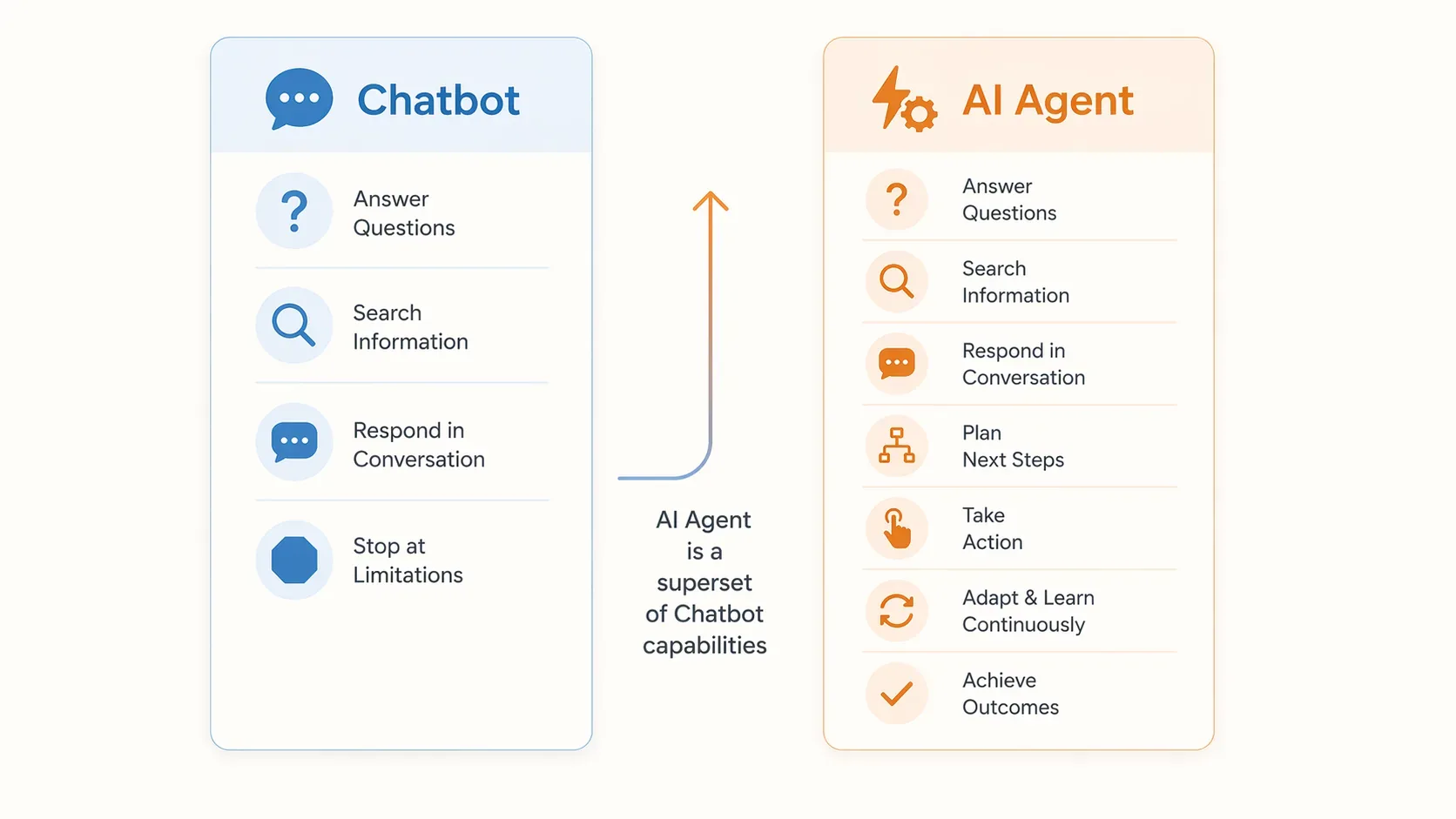
Quick Answer: An AI agent is a software program that uses AI to complete tasks autonomously across multiple systems, not just answer questions. Unlike a chatbot that responds to one message at a time, an AI agent can understand a goal, plan the steps to achieve it, take actions across your tools, and adapt when something changes mid-task. Think of it as the difference between asking a question and assigning a task to a junior employee who has access to all your tools.
A simple comparison:
- A traditional automation says: "If a new lead comes in, send them email A."
- A chatbot says: "Hi, you asked about pricing. Here is our pricing."
- An AI agent says: "I see this is a new lead from a SaaS company in the US with 50+ employees. I will enrich their data from LinkedIn, score them as enterprise tier, send them the enterprise welcome sequence, schedule a call with the AE assigned to that segment, and update Salesforce. If they reply, I will adjust the next steps."
That is the gap.
The technical underpinnings are large language models (the "brain" of the agent), tool integrations (the "hands" that act on systems), memory (the "context" that persists across steps), and orchestration (the "plan" that figures out what to do).
The MIT Sloan paper that popularised the modern definition put it this way: AI agents enhance large language models by enabling them to "execute multi-step plans, use external tools, and interact with digital environments to function as powerful components within larger workflows".
That last phrase is the important one. Agents are components inside a workflow, not magical do-everything robots.
What is the difference between an AI agent and an AI chatbot?
Quick Answer: A chatbot answers questions or follows a script. An AI agent takes actions on your behalf across multiple systems. A chatbot might tell you when slots are available. An AI agent actually books the appointment, sends the confirmation, updates the CRM, and rearranges your calendar if there is a conflict. The line is blurring in 2026 as modern chatbots gain agentic capabilities, but the distinction in scope of action is real.
Here is the cleanest way to tell them apart:
| Capability | Chatbot | AI Agent |
|---|---|---|
| Answers questions | Yes | Yes |
| Looks up information | Yes | Yes |
| Holds a multi-turn conversation | Yes | Yes |
| Plans a sequence of steps to reach a goal | No | Yes |
| Takes actions in external systems (CRM, calendar, payment) | Limited | Yes |
| Adapts when something fails or changes | No | Yes |
| Works without prompting at every step | No | Yes |
If you have a chatbot today and you are happy with it, that does not mean you do not need agents. It means your chatbot is doing the conversational layer, and agents are the next thing you add for the workflow layer.
For more on the chatbot side, see our AI Chatbots for Business guide.
Why is everyone talking about AI agents in 2026?
Quick Answer: AI agents went from research demos to production tools in 2025, and 2026 is the year they hit critical mass. Gartner predicts over 40 percent of enterprise applications will embed AI agents by end of 2026. PwC's 2026 predictions call agentic AI "the defining opportunity" for enterprises. Real deployments are reporting 30 to 50 percent process time reductions and ROI in the 280 to 520 percent range in the first year. The gap between early adopters and laggards is widening fast.
The numbers are striking:
- 40 percent of enterprise applications will embed role-specific AI agents by end of 2026 (Gartner forecast)
- 30 to 50 percent process time reductions reported by organisations implementing enterprise automation strategies in 2026
- 60 percent reduction in administrative tasks through generative AI in operations
- 280 to 520 percent annual ROI on focused agentic AI deployments
- AI agents can do roughly half of the tasks people currently do in routine business operations (PwC 2026 prediction)
The big shifts that made this possible in 2025-2026:
- Standardised tool connectivity. Protocols like MCP (Model Context Protocol) mean agents can plug into business tools without bespoke integrations.
- Better reasoning models. Claude Sonnet 4.5, GPT-4o, and Gemini 2.5 handle multi-step planning that earlier models could not.
- Mature orchestration frameworks. Tools like CrewAI, LangGraph, n8n, and Gumloop let teams build agent workflows without inventing the wheel.
- Production guardrails. Observability, audit trails, and human-in-the-loop checkpoints have matured enough to deploy agents in real workflows safely.
This is why the conversation moved from "should we experiment" to "how fast can we scale this".
What can AI agents actually do in a business right now?
Quick Answer: The highest-ROI AI agent use cases in 2026 are sales lead enrichment and qualification, customer support triage and escalation, document and invoice processing, employee onboarding workflows, IT helpdesk automation, content distribution and scheduling, cross-system data sync, and finance operations like collections and payment reconciliation. The pattern they share is high volume, rule-governed structure, and dependence on cross-system coordination.
Here is what real production deployments look like by function:
Sales and marketing agents
- Lead enrichment. When a new lead fills out a form, an agent pulls their LinkedIn data, company size, industry, tech stack, and revenue estimates from public sources. Real example: Gelato improved lead quality and prioritization with agents that enrich leads with data on company size, printer infrastructure, and revenue estimates.
- Lead qualification. Agent scores leads in real time based on the enriched data and routes them to the right tier (SDR, AE, marketing nurture).
- Outbound personalisation. Agent drafts personalised first-touch emails based on the lead's company, role, and recent activity.
- Content distribution. Agent takes a published blog post and distributes it across LinkedIn, X, your newsletter, and Slack channels with formatting tuned for each.
Customer support agents
- Triage and routing. Agent reads the incoming ticket, identifies the issue category, the customer's plan tier, and urgency, and routes to the right queue.
- First-pass resolution. For routine issues, the agent attempts resolution without involving a human.
- Escalation with context. When escalation is needed, the agent passes the full conversation history and any actions already taken, so the human is not starting from zero.
Operations and finance agents
- Invoice processing. Agent reads incoming invoices, extracts line items, matches them against POs, flags discrepancies, and routes for approval.
- Collections. Agents prioritise customers in arrears, draft outreach emails, and propose payment plans (already common in tools like Sage Intacct).
- Expense reconciliation. Agent matches credit card transactions to receipts and flags exceptions.
HR and people ops agents
- Onboarding orchestration. Multi-step onboarding workflows (provisioning accounts, sending docs, scheduling intros) coordinated end-to-end.
- Benefits and policy questions. Agents give personalised answers based on the employee's enrollment status and company policies.
- Offboarding. Compliance-tracked offboarding workflows with audit trails.
IT and internal support agents
- Account unlock and password reset. Frequently the highest-ROI internal use case in mid-size companies.
- Software access requests. Agents handle the request, approval routing, and provisioning end-to-end.
- First-line IT troubleshooting. Resolves common issues before they hit the help desk.
The common pattern: high transaction volume, structured workflow logic, and multi-system coordination. The more of these characteristics a workflow has, the more an agent will outperform manual handling or rule-based automation.
How do you decide if your business should deploy AI agents?
Quick Answer: Deploy AI agents when you have a high-volume workflow that spans multiple tools, follows repeatable rules, and currently consumes meaningful staff time on coordination rather than judgement. Skip agents for low-volume tasks, high-stakes decisions that need human judgement, or workflows where the data is unstructured and inconsistent. The fastest ROI comes from picking one well-scoped workflow first, proving it, then expanding.
A simple decision framework that mirrors what enterprise consultants are using in 2026:
Score each candidate workflow on these 5 dimensions
- Volume. Does this workflow run 100+ times per month? More is better.
- Repeatability. Are the steps roughly the same every time, with predictable variations?
- Multi-system. Does it touch 2+ tools (CRM, email, calendar, ERP, etc.)?
- Time cost. Is your team currently spending real hours on this?
- Acceptable error rate. Is occasional human review sufficient, or does every output need to be perfect?
Workflows that score high on the first four and have an acceptable error rate (with human review) are great agent candidates.
When agents are NOT the right answer
- Low volume. If a task happens 5 times a month, just do it manually.
- High stakes, low tolerance. Legal contracts, medical diagnoses, life-altering financial decisions. Use AI to assist humans, not act autonomously.
- Unstructured, inconsistent data. Agents need data they can reason about. If your inputs are constantly changing format, fix the data first.
- No clear success metric. If you cannot measure whether the agent is succeeding, you cannot improve it.
How do you deploy AI agents the right way?
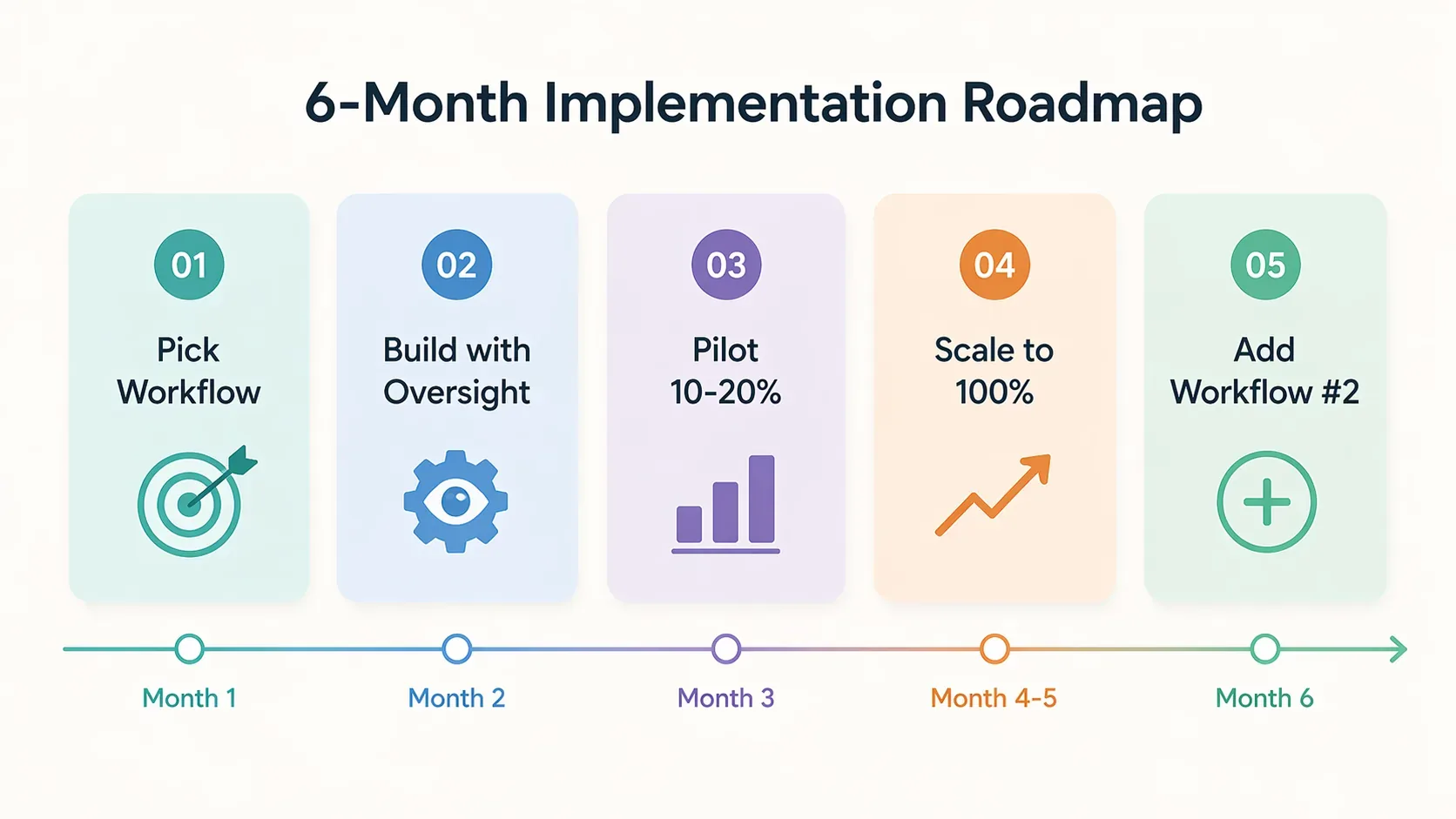
Quick Answer: Deploy AI agents in 5 phases: pick one well-scoped workflow, build it with human-in-the-loop oversight, run a controlled pilot for 4 to 6 weeks, measure results rigorously, then scale to additional workflows only after the first one is stable. The biggest mistake is trying to automate everything at once. The businesses with the highest agentic AI ROI use a "start narrow, expand methodically" approach.
A practical 6-month deployment plan that mirrors what enterprise teams use in 2026:
Months 1-2: Pick the workflow and design the architecture.
- Score your workflow candidates on the 5 dimensions above
- Pick the one with the highest score
- Map every step the workflow currently takes
- Decide which steps the agent will handle and which need human approval
- Pick the tools (CrewAI, n8n, Gumloop, custom build, etc.)
Months 2-3: Build with human-in-the-loop oversight.
- Build the agent for one workflow, not five
- Every action should have logs and audit trail from day one
- Insert human approval checkpoints at any high-stakes step
- Test on synthetic data first
Months 3-4: Pilot deployment.
- Run on 10 to 20 percent of real volume
- Manually review every agent output for the first 2 weeks
- Track success rate, error rate, and cost per task
- Fix the obvious failures, document the edge cases
Months 4-5: Scale the same workflow.
- Expand to 100 percent of the workflow's volume
- Reduce manual review to spot-checks
- Set up automated alerts for unusual behaviour
Months 5-6: Pick workflow #2.
- Based on what you learned, identify the next workflow
- Reuse the agent infrastructure where possible
- Compounding ROI starts to show up here
The 4 mistakes that kill agentic AI deployments
- "Boil the ocean" syndrome. Trying to automate everything in month one. Pick one workflow.
- No governance from day one. Permissions, audit logs, and accountability are not optional. They have to exist before the agent goes live, not after something breaks.
- No measurement. If you cannot prove the agent is faster, cheaper, or more accurate than the manual process, you have a science project, not a business tool.
- Treating agents as fully autonomous. The successful 2026 deployments use heavy human-in-the-loop oversight in the first 6 months, then gradually expand autonomy as the agent proves itself.
What tools and platforms should you actually look at?
Quick Answer: The 2026 agentic AI tool landscape splits into 4 categories: enterprise platforms (Oracle AI Agent Studio, Salesforce Agentforce, ServiceNow), no-code agent builders (Gumloop, n8n, Relevance AI, CrewAI), conversational frameworks (LangGraph, Vercel AI SDK), and custom builds with raw LLM APIs (OpenAI, Anthropic, Google). Most small and mid-sized businesses are best served by no-code agent builders for simpler workflows and custom partner-led builds for anything that needs deep integration.
Here is the simplified landscape:
Enterprise platforms (large companies, complex compliance)
- Oracle AI Agent Studio for Fusion Applications. Latest 2026 update added agentic applications builder, workflow orchestration, ROI dashboards.
- Salesforce Agentforce. Tightly integrated with Salesforce data and workflows.
- ServiceNow AI Agents. Strong for IT and HR workflows.
- Microsoft Copilot Studio. Integrated with Microsoft 365.
No-code agent builders (most small to mid-size businesses fit here)
- Gumloop. Visual workflow builder, marketing/sales/ops focus, good for non-technical builders.
- n8n. Open-source, more flexibility, steeper learning curve.
- CrewAI. Multi-agent orchestration, popular with technical teams.
- Relevance AI. Operations-focused agent platform.
- Zapier AI. Strong for connecting existing Zapier workflows with agentic capabilities.
Custom builds with raw LLM APIs
- OpenAI Assistants and Realtime API. Strong general capability, large ecosystem.
- Anthropic Claude API. Excellent for complex reasoning and long-context tasks.
- Google Gemini API. Best price-performance for high-volume tasks.
For most small and mid-sized businesses, the right starting point is a no-code agent builder for simpler workflows and a partner-led custom build for anything that needs deep integration with your specific systems.
What about the risks? Are AI agents safe to use in business?
Quick Answer: AI agents in production today require deliberate governance: role-based access controls, audit trails, human-in-the-loop checkpoints for high-stakes actions, and continuous monitoring. The real risks in 2026 are hallucinations (agents making up information), data leakage (agents exposing sensitive info), bias in outcomes, and over-permissioning (giving an agent more access than it needs). All four are manageable with the right governance, none of them are reasons to avoid agents entirely.
The risks worth taking seriously, in order of likelihood:
- Over-permissioning. Giving an agent broader access to systems and data than it actually needs for the task. Use the principle of least privilege.
- Hallucinations. Agents confidently making up information. Mitigate with retrieval-augmented generation (RAG) and explicit "I don't know" handling.
- Cascading errors. Agent makes a small mistake, then takes 5 more actions based on it. Mitigate with checkpoints and rollback procedures.
- Data leakage. Sensitive data ending up in prompts or logs. Mitigate with data masking, prompt engineering, and SOC 2-compliant tooling.
- Compliance and audit. Regulators want to know who decided what. Make sure every agent action is logged, attributable, and reviewable.
Agents today are imperfect, but new technologies generally are. Now that companies know how to proceed, with focused, centralized implementation guided by real-world benchmarks, 2026 could be the year when agents shine.
That is roughly the right framing. Treat agents seriously, deploy with guardrails, and measure relentlessly.
What does this mean for small and mid-sized businesses?
Quick Answer: For small and mid-sized businesses, the right move in 2026 is to deploy 1 to 2 narrow agentic workflows that target high-volume, time-sucking tasks like lead enrichment, support triage, or appointment scheduling. The window for first-mover advantage is real but closing. Businesses that have working agents in 2026 will compound that lead through 2027 as the technology matures, while late adopters face a much wider gap to close.
You do not need a million dollar enterprise platform or a data science team. The 2026 reality is that small businesses can deploy meaningful agentic AI workflows for $200 to $2,000 per month using no-code tools, or $5,000 to $25,000 in one-time custom builds for deeper integrations.
A reasonable first agent for most small businesses:
- A lead handling agent that enriches new leads, scores them, sends a personalised first response, books a meeting if interest is high, and updates your CRM.
- A customer support triage agent that reads incoming tickets, answers the obvious ones, and routes the rest to the right person.
- An appointment and scheduling agent for service businesses that handles the back-and-forth of finding a time, sending reminders, and rescheduling.
Each of these typically pays back within 3 to 6 months and starts compounding from there.
Ready to deploy your first AI agent?
The hardest part of agentic AI is not the technology. It is picking the right workflow, scoping it tightly, building it with proper guardrails, and measuring results so you know what to expand next.
SAM's AI Services builds custom AI agents and AI automation workflows for small and mid-sized businesses. We focus on agentic systems that fit your real workflow, ship in 4 to 8 weeks, and pay for themselves within 6 months.
- 3x faster growth from agents that handle the work your team should not be doing
- 50% cost savings vs hiring or expanding your operations team
- 100% AI-powered systems built around your specific workflows and tools
If you want a free 30-minute conversation about which agentic workflow would have the highest ROI in your business, get in touch here. No pitch, no pressure, just a clear assessment of what is worth automating first.
Frequently Asked Questions
What is an AI agent in simple terms?
An AI agent is a software program that uses artificial intelligence to complete tasks autonomously across multiple systems, not just answer questions. Unlike a chatbot that responds to one message at a time, an AI agent can understand a goal, plan the steps to achieve it, take actions across your tools, and adapt when things change. Think of it as the difference between asking a question and assigning a task.
What is the difference between an AI agent and a chatbot?
A chatbot answers questions or follows scripts. An AI agent takes actions on your behalf across multiple systems. A chatbot might tell you your appointment options. An AI agent actually books the appointment, sends the confirmation, updates your CRM, and rearranges your calendar if there is a conflict. The 2026 line between them is blurring as modern chatbots gain agentic capabilities.
What can AI agents do for a business?
AI agents in 2026 handle multi-step business workflows like lead enrichment and qualification, invoice processing, employee onboarding, customer support escalations, IT helpdesk requests, sales follow-ups, content distribution, and cross-system data synchronization. The highest-ROI use cases are high-volume, rule-governed workflows that span multiple tools.
What is the ROI of AI agents in business?
Organizations implementing agentic AI workflows in 2026 report 30 to 50 percent reductions in process time, 60 percent reduction in administrative tasks, and ROI in the 280 to 520 percent range within the first year on well-scoped deployments. Gartner predicts that by the end of 2026, over 40 percent of enterprise applications will embed AI agents.
Is agentic AI ready for production use?
Yes, for narrow, well-defined workflows with structured data and human-in-the-loop oversight. Production deployments are common in lead enrichment, customer service triage, document processing, IT helpdesks, and HR support. Agentic AI is not yet ready for fully autonomous high-stakes decisions without human review, and the businesses succeeding with it deploy with clear guardrails, governance, and observability.
What is the best AI agent platform to start with?
For small and mid-sized businesses, no-code agent builders like Gumloop, n8n, or Relevance AI are usually the best starting point because they let you build real workflows without engineering effort. For enterprise environments with strict compliance requirements, platforms like Oracle AI Agent Studio, Salesforce Agentforce, and Microsoft Copilot Studio are better fits.
Can AI agents make mistakes that hurt my business?
Yes, which is why every responsible 2026 deployment uses human-in-the-loop checkpoints at high-stakes steps, audit logs for every action, and clear rollback procedures. The risk is real but manageable. The bigger risk for most businesses right now is not deploying agents at all and watching competitors compound efficiency gains.
Will AI agents replace human jobs?
For routine, repetitive coordination work, yes. PwC's 2026 prediction is that agents can do roughly half of the tasks people currently do in routine business operations. The pattern in successful deployments is that the freed-up human time goes to higher-value work: judgement, relationships, strategy, and the parts of the job that actually require a person.