AI Chatbots for Business in 2026: Real ROI, Use Cases, and How to Pick the Right One
AI chatbots for business in 2026 handle 70 to 80 percent of customer questions automatically, deliver an average 340 percent first-year ROI, and reduce customer service costs by 30 to 40 percent. The best fits for most small and mid-sized businesses cost under $200 per month and pay back in around 3 months.
By SAM's AI Services Team · 2026-04-25
Quick Answer: AI chatbots for business in 2026 handle 70 to 80 percent of customer questions automatically, deliver an average 340 percent first-year ROI, and reduce customer service costs by 30 to 40 percent. The best fits for most small and mid-sized businesses cost under $200 per month, pay back in around 3 months, and increase conversion rates by 2 to 3x because visitors who engage with a chatbot are 2.8 times more likely to convert than those who do not.
If you have a business website and you are not running an AI chatbot on it yet, you are leaking customers every day. They land on your site, scroll for 30 seconds, can not find what they need, and bounce to a competitor whose chatbot answered them in 2 seconds.
This guide is for business owners deciding whether to add an AI chatbot, which one to pick, and what kind of returns to actually expect. It is based on the 2026 industry data, not on vendor marketing claims.
What is an AI chatbot, and how is it different from the old ones?
Quick Answer: An AI chatbot is a virtual assistant that uses large language models, natural language processing, and machine learning to understand customer questions and respond conversationally. Unlike older rule-based chatbots that followed scripted decision trees, modern AI chatbots in 2026 understand intent, handle follow-up questions, and learn from every conversation. They feel more like talking to a junior staff member than navigating a phone menu.
The chatbots most people remember from 5 years ago were terrible. They asked you to choose from 4 buttons, missed your actual question, and made you angrier with every response. Those were rule-based bots, and they deserve their bad reputation.
The 2026 generation is different. Powered by GPT-4o, Claude Sonnet 4.5, and Gemini, these chatbots:
- Read what you actually wrote, not just keywords
- Understand follow-up questions and context across multi-turn conversations
- Pull real-time data from your CRM, calendar, or product catalog
- Decide when to hand off to a human, with full conversation context
That last point is what separates a useful chatbot from a frustrating one. Modern hybrid deployments handle the first 80 percent of questions automatically, then route the complex 20 percent to a real person who already knows what the customer asked.
Why are businesses adopting AI chatbots so fast right now?
Quick Answer: Businesses are deploying AI chatbots at record pace in 2026 because customer expectations and unit economics finally align. 90 percent of consumers rate immediate responses as important or very important, while a single human support agent in the US now costs over $4,400 per month including benefits. AI chatbots respond in seconds, never sleep, and cost a fraction of a single hire. Industry research shows 64 percent of small businesses plan to adopt chatbot technology by the end of 2026.
The numbers driving adoption are blunt:
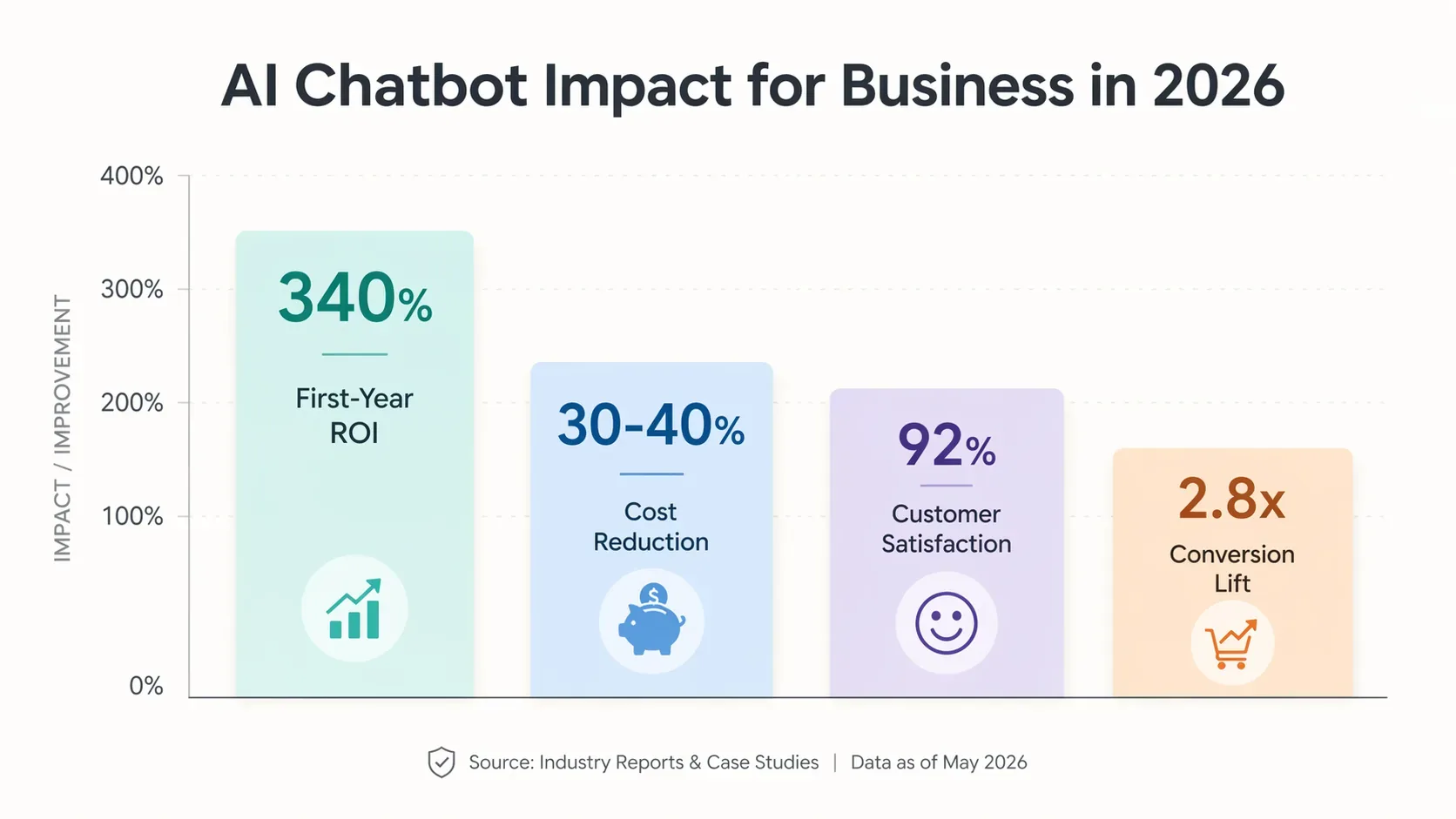
- 340 percent average first-year ROI, with payback periods as short as 3 months (Silver Touch 2026 industry data)
- 30 to 40 percent reduction in customer service costs for businesses deploying AI chatbots properly
- $2.5 million in average annual savings reported by larger deployments
- 64 percent of small businesses plan to adopt chatbot technology by end of 2026
- 92 percent customer satisfaction rate reported across AI chatbot deployments
- Visitors engaging with a chatbot are 2.8x more likely to convert than those who do not (Drift 2025 benchmark)
- Over 60 percent of customers now prefer chatbots over waiting for a live agent for quick answers (HubSpot 2026)
The AI chatbot market itself is projected to hit $29.5 billion by 2029, growing at 23.3 percent annually. That is the kind of growth curve where late adopters spend years catching up.
What can an AI chatbot actually do for your business?
Quick Answer: A modern AI chatbot in 2026 can handle 70 to 80 percent of customer questions automatically, qualify leads, book appointments, process orders, recommend products, troubleshoot issues, update CRM records, and operate 24/7 across your website, WhatsApp, Instagram, SMS, and phone. The right deployment turns your website into a 24/7 sales and support assistant that scales without scaling costs.
Here is what the highest-impact chatbot use cases actually look like in real businesses:
1. 24/7 customer support (the obvious one)
This is what most businesses think of first. A chatbot answers FAQs, troubleshoots common issues, looks up orders, processes returns, and handles the kind of questions that drown your support team during business hours and never get answered after hours.
A typical mid-size e-commerce setup looks like this:
- Bot handles 2,100 of 3,000 monthly conversations automatically (70 percent automation rate)
- Cost per AI conversation: around $0.75
- Cost per human conversation: around $7 to $7.33
- Net monthly saving: around $13,800
- Annual saving: around $165,000
The ROI is not theoretical. It is what these deployments are doing right now.
2. Lead qualification and booking
This is where the real revenue lift sits. Most small business sites have a "Contact Us" form that converts at 1 to 3 percent. An AI chatbot that engages, qualifies, and books a meeting in real time consistently converts 8 to 15 percent of the same traffic. The math is dramatic.
A real estate case study published in early 2026 showed a 45 percent increase in qualified appointments and 30 percent less time spent on unqualified leads after deploying an AI chatbot for lead qualification.
3. Product recommendations and shopping assistance
For e-commerce sites, chatbots that ask the right qualifying questions ("what is the bedroom for? how much storage do you need?") and recommend the right product close more sales and reduce returns. A chatbot trained on your full catalog can essentially work as a 24/7 personal shopping assistant for every visitor.
4. Internal workflows (the underrated use case)
Most articles focus on customer-facing chatbots, but internal AI chatbots are quietly the highest-ROI use case in many small businesses. Things like:
- An HR chatbot that answers questions about leave, benefits, and policies
- An IT chatbot that resets passwords and unlocks accounts
- An ops chatbot that surfaces information across your tools
- An onboarding chatbot for new hires
Companies running these report eliminating thousands of internal tickets per month.
5. Voice and phone reception
This is the fastest-growing chatbot category in 2026. 45 percent of new chatbot deployments now include voice capabilities, projected to reach 78 percent by year end. AI phone receptionists answer calls on the first ring, qualify the caller, book the appointment, and route emergencies to a human, all in a natural conversational voice.
For service businesses (clinics, contractors, dentists, plumbers), this is often the single highest-ROI automation available, because missed calls translate directly to missed revenue.
How much does an AI chatbot actually cost?
Quick Answer: Off-the-shelf AI chatbot platforms in 2026 range from free to around $500 per month, with most small business deployments landing between $50 and $200 per month. Custom AI chatbots built around your specific data and workflows typically cost $1,500 to $10,000 upfront depending on integrations and complexity. ROI usually arrives within 3 months and reaches 340 to 900 percent in the first year.
There are three pricing models you will see most often:
Model 1: Per-seat or per-domain monthly
Used by tools like Intercom Fin, Tidio, Drift. Typical entry plans start at $35 to $99 per seat per month. Often combined with a per-resolution fee (like Intercom Fin's $0.99 per resolved conversation).
Best for: businesses with predictable conversation volume and a small support team.
Model 2: Tiered usage based on conversations or messages
Used by tools like Chatty, Botsonic, Manychat. You pick a tier based on how many conversations you expect per month. Plans range from free trial up to $300 per month for higher volumes.
Best for: businesses with growing or seasonal volume.
Model 3: Custom build with monthly maintenance
You hire a partner to build a chatbot specifically for your business, trained on your data, connected to your tools. Typical investment is $1,500 to $10,000 upfront plus a small monthly maintenance fee or flat retainer.
Best for: businesses where the chatbot needs to integrate deeply with existing systems (CRM, booking, internal databases) or handle workflows that off-the-shelf tools cannot.
A simple ROI math you can run today
Use this formula from Oscar Chat's 2026 ROI guide:
Monthly Savings = (Monthly Conversations x Automation Rate x Cost Per Human Conversation) - Monthly Chatbot CostPlug in real numbers. If you handle 1,000 conversations per month, automate 70 percent, and your cost per human conversation is around $7:
(1,000 x 0.70 x $7) - $150 = $4,750 saved per monthThat works out to around $57,000 per year on a tool costing under $200 per month.
How do you pick the right AI chatbot for your business?
Quick Answer: Pick an AI chatbot based on three things: where your customers actually contact you, how complex the conversations get, and what systems the bot needs to talk to. A solo founder selling online needs something different from a multi-location service business or a B2B SaaS. The biggest mistake is picking the most popular tool instead of the right one for your workflow.
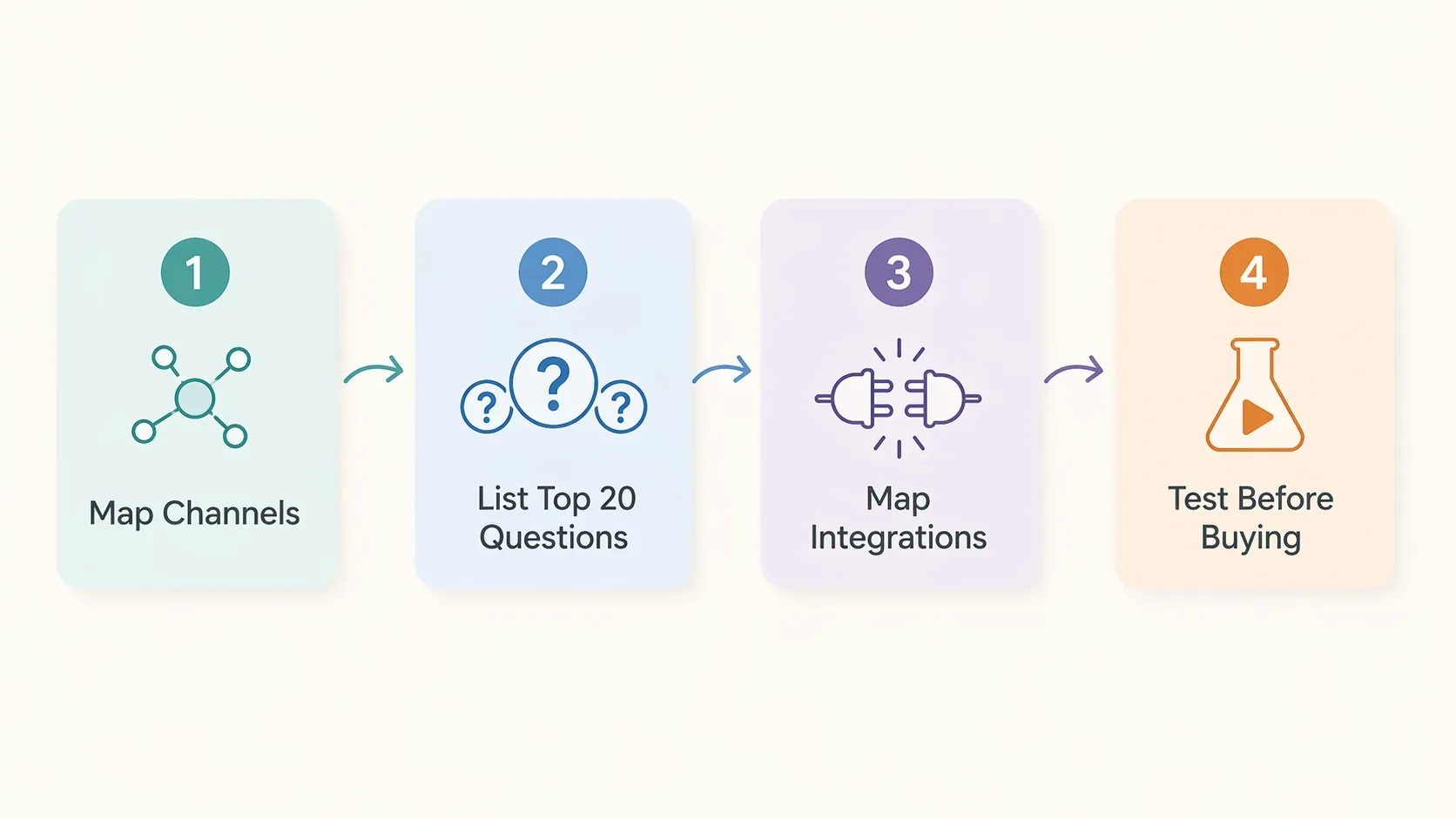
Here is the decision framework that works in real deployments:
Step 1: Map your channels
Where do your customers actually reach you? Website? WhatsApp? Instagram DMs? Phone? Email? Each channel has its own best-fit chatbot category. A chatbot that is amazing on a website might be useless on phone calls.
Step 2: Map your top 20 questions
Before you shop for tools, write down the 20 questions your customers ask most often. Are they mostly:
- Repetitive FAQs (hours, pricing, policies)? Almost any modern chatbot handles these.
- Lookups (order status, appointment availability, account info)? You need a chatbot that integrates with the system that holds the data.
- Complex troubleshooting? You need an LLM-powered bot, not a rule-based one.
- Sales conversations? You need one designed for lead qualification, not just support.
Step 3: Map your integrations
What systems does the bot need to talk to? Your CRM? Booking system? Inventory? Payment processor? This is where most off-the-shelf tools start to fall short. Make sure the chatbot you pick can actually connect to where your data lives.
Step 4: Test, do not trust
Most chatbot platforms offer free trials. Spend a weekend training one on your real FAQs and product catalog and see how it handles the questions you wrote down in Step 2. The difference between great and mediocre AI chatbots is shockingly large until you actually test them.
Common chatbot categories and what they fit
| Category | Best for | Typical cost |
|---|---|---|
| Website lead-gen chatbots (Drift, Intercom Fin) | B2B SaaS, service businesses | $35 to $300/mo |
| E-commerce chatbots (Chatty, Tidio, Gorgias) | Shopify and online stores | $30 to $200/mo |
| Multi-channel customer support bots (Zendesk AI, Freshchat) | Support-heavy businesses | $50 to $400/mo |
| Internal AI chatbots (Moveworks, ServiceNow AI) | Mid-size companies with internal IT/HR volume | $100 to $500/mo per use |
| Custom-built chatbots | Workflows that off-the-shelf cannot handle, data-sensitive industries | $1,500 to $10,000 upfront |
| AI phone receptionists | Service businesses with high inbound call volume | $100 to $500/mo |
How do you train and deploy an AI chatbot the right way?
Quick Answer: Train an AI chatbot by feeding it your real FAQs, support tickets, product catalog, and brand voice guidelines, then test it on dozens of real questions before going live. Deploy with a clear escalation path to human agents and review transcripts weekly to catch and fix gaps. Expect 4 to 6 weeks from kickoff to full deployment, and plan for ongoing maintenance, not a one-time launch.
The chatbots that fail are almost always the ones treated as "set and forget". The ones that work are treated like new hires. Trained, supervised, reviewed, retrained.
A practical 6-week deployment plan:
Week 1: Data preparation. Pull your top 100 customer questions from support tickets, emails, and chat logs. Pull your full product or service catalog, your hours, your policies, your pricing. This is your training corpus.
Week 2: Initial training and testing. Load the data into the chatbot platform. Run it through your top 100 questions yourself. Identify gaps and weird responses. Refine the training.
Week 3: Soft launch. Roll out to 10 to 20 percent of your traffic or to a single channel (website only, not WhatsApp yet). Review every conversation manually. Catch and fix failures.
Week 4: Iteration. Tune based on real conversations. Add the questions you missed. Remove the responses that are too generic.
Week 5: Full launch. Roll out to 100 percent of channels. Set up automated alerts for unusual conversations, low-confidence responses, and escalations.
Week 6+: Ongoing maintenance. Review transcripts weekly. Retrain monthly. Track resolution rates, escalation rates, customer satisfaction scores. A chatbot that never gets reviewed slowly gets worse.
Mistakes that kill chatbot ROI
The patterns I see in chatbot deployments that fail:
- No real training data. Generic out-of-the-box chatbots produce generic results. The training data is the product.
- No human escalation path. When the bot gets stuck, the customer hits a dead end and bounces. Always have a clear handoff to a human, with full conversation context preserved.
- Treating it as a fire-and-forget project. Chatbots that never get reviewed slowly drift into giving worse answers as the world changes.
- No measurement. If you cannot track resolution rate, escalation rate, and CSAT (customer satisfaction score), you cannot improve the bot.
- Hiding the bot identity. Modern best practice and most regulations require you to disclose when users are chatting with a bot. Transparency outperforms deception in every long-term trust metric.
How does an AI chatbot affect SEO and your website performance?
Quick Answer: A well-implemented AI chatbot improves SEO indirectly by reducing bounce rate, increasing time on site by 2 to 4x, and improving conversion rates. A poorly-implemented one hurts SEO by slowing your site down or interrupting users with intrusive popups. The key is picking a lightweight chatbot, setting trigger timing carefully (15 to 30 seconds of dwell time, or exit intent), and making sure it does not block Core Web Vitals.
This is one of the most overlooked benefits of AI chatbots. They work as a soft conversion tool that also signals to Google that your page satisfies user intent.
The mechanism:
- Lower bounce rate. A visitor who chats stays longer than one who scrolls and leaves. Google reads that as a positive engagement signal.
- Higher time on site. Conversations take time. Engaged users typically spend 2 to 4x longer on your site.
- Higher conversion rates. Forms convert at 1 to 3 percent. Chatbot interactions convert 5 to 10 percent of users into a lead, demo, or sale.
The risk is on the technical side. A heavy chatbot script that blocks the main thread or covers the entire screen on mobile actively hurts your Core Web Vitals, which is now a real ranking factor. Pick a lightweight chatbot, configure trigger timing intelligently, and watch your PageSpeed scores after deployment.
For deeper SEO context, see our AI SEO and Answer Engine Optimization guide.
What is next for AI chatbots in 2026 and beyond?
Quick Answer: AI chatbots are evolving from answer engines into agents that take actions across systems. The biggest 2026 shifts are voice-first chatbots (45 percent of new deployments include voice, projected to hit 78 percent by year end), multimodal chatbots that handle text, voice, image, and video, and agentic chatbots that complete entire workflows like booking, purchasing, and processing returns autonomously.
The line between "chatbot" and "AI agent" is blurring fast. The next generation of chatbots:
- Take actions, not just answer questions. Book the meeting, process the return, update the CRM, all without human handoff.
- Use multiple modalities. Speech, image, video, text, all in one conversation.
- Remember context across sessions. Returning customers do not have to re-explain themselves.
- Run across channels seamlessly. Start on the website, continue on WhatsApp, finish on a phone call without losing context.
Businesses that have a working chatbot today are in a strong position to layer on agentic capabilities through 2026 and 2027. Businesses that are still on the fence are about to face a much wider gap.
Ready to deploy an AI chatbot that actually works for your business?
The hardest part of an AI chatbot is not the technology. It is picking the right tool, training it on your real business data, setting up the right escalation paths, and reviewing it consistently so it gets better instead of worse over time.
SAM's AI Services builds AI chatbots and AI automation systems for small and mid-sized businesses that need a chatbot to actually fit their workflow, not just sit on their site.
- 3x faster growth from a chatbot that captures leads and books meetings 24/7
- 50% cost savings vs hiring additional support staff
- 100% AI-powered systems trained on your data, connected to your tools
If you want a free 15-minute conversation about which type of AI chatbot would actually move the needle for your business, get in touch here. No pitch, no pressure, just a clear recommendation based on your real workflow.
Frequently Asked Questions
How much does an AI chatbot cost for a business?
AI chatbot costs in 2026 range from free to around $500 per month for off-the-shelf platforms, with most small businesses spending $50 to $200 per month. Custom-built AI chatbots typically start at $1,500 to $10,000 upfront depending on integrations and complexity. The average mid-size business sees 900 percent first-year ROI on a chatbot costing under $200 per month.
What is the ROI of an AI chatbot?
Average first-year ROI on a business AI chatbot is around 340 percent, with payback periods as short as three months. Businesses report 30 to 40 percent reduction in customer service costs and average savings of around $2.5 million annually for larger deployments. Visitors who engage with a chatbot are 2.8 times more likely to convert than those who do not.
Will an AI chatbot replace my customer support team?
No, an AI chatbot replaces the repetitive 70 to 80 percent of support questions, not the entire team. Modern hybrid setups have AI handle routine queries automatically and escalate complex cases to human agents with full conversation context. This frees support staff to focus on high-value cases instead of resetting passwords.
What can an AI chatbot actually do for my business?
A modern AI chatbot can answer FAQs, qualify leads, book appointments, process orders, recommend products, troubleshoot issues, update CRM records, route urgent issues to humans, and operate 24/7 across website, WhatsApp, Instagram, and SMS. The best ones learn from every conversation and improve over time.
How long does it take to set up an AI chatbot?
A basic off-the-shelf AI chatbot can be set up in a few hours. A well-trained chatbot connected to your business data, CRM, and workflows usually takes 2 to 6 weeks for proper deployment. Average payback period across small business case studies is around 3 months, with full ROI by month 6.
Can AI chatbots handle complex customer questions?
Yes, modern AI chatbots powered by large language models like GPT-4o and Claude Sonnet 4.5 handle multi-turn conversations, context retention, and complex troubleshooting that older rule-based bots could not. For genuinely edge-case questions, the best deployments escalate to a human agent with full conversation history preserved.
Is my customer data safe with an AI chatbot?
It depends on the platform and how you set it up. Choose a chatbot with SOC 2 certification, review the data handling policy carefully, limit what customer data the bot can access, and mask sensitive fields before they reach the model. For regulated industries (healthcare, finance, legal), work with a partner who understands your compliance framework.
What is the difference between an AI chatbot and an AI agent?
An AI chatbot answers questions and provides information. An AI agent takes actions on your behalf across systems, like actually booking the meeting, processing the order, or updating records. The lines are blurring fast in 2026, and most modern chatbot platforms now include agentic capabilities for specific workflows.